Showing posts with label Pc Tips. Show all posts
Showing posts with label Pc Tips. Show all posts
Monday, February 11, 2019

Sunday, November 11, 2018
Friday, September 22, 2017
How to Hide your Computer From the Other Computers on the Network

To prevent computers and devices on networks you connect to from being able to see your computer, you need to disable the network discovery setting. Network discovery enables your computer to be accessible on other network computers, and though this can be useful in home networks you should always disable it when you're on a public, untrusted network. Once you've disabled network discovery, your computer will be hidden from any other computers and devices on the network.
Let's do this------>
(1) -- > Right-click
the network or Wi-Fi icon in the system tray area of the Windows
taskbar and select "Open Network and Sharing Center."
(2)--> Click the "Change advanced sharing settings" link in the left pane.
(3)--> Select the "Turn off network discovery" option. The "Turn on network discovery" option is deselected automatically.
(4)--> Click the "Save changes" button. Confirm the operation or type in your administrator password, if prompted.
Tip
- check When you first connect to a network in Windows 8, select the "No, don't turn on sharing or connect to devices" option that appears; this selection disables network discovery. If you didn't select this setting when you connected to a network, follow the steps above to manually disable network discovery.
Warning
- close Information in this article applies to Windows 8. It may vary slightly or significantly in other Windows version.
<-- IF YOU DON'T UNDEERSTAND PLEASE WATCH THIS VEDIO ON YOUTUBE-->

Thursday, September 21, 2017
Now your computer will run on the Automatic System, with some premium automated software help
As Salamu Alaikum, I hope everyone is well. Alhamdulillah, I am fine too. But I'm very paraye. I have 24 hours to think 24 minutes. If the time was a bit more then. I can not keep working so long in any direction online. But the work is not going to end.So always think about how to make things easier. The typing speed is 34 wards per minute, but it does not seem to be enough. It would seem good if you had 60 words per minute. But I do not think it's possible for me.Well, whatever the way we try to adopt some of the ways that we can work a lot in a short time.So I have come up with a thing that hopefully will help you a bit.
What is actually this automation software? These are software that lets you do many things that you have to repeat.For example, an email has to be given initially for the same reply.Or Bitcoin Income is free to catch a free beta dot in the bar. You can do this kind of work by using automation software. That means you will do the job once you do it on the automation software, you will do the same thing in the same way.So let's talk about this thing and do not need to talk about it. And when I said the truth? In fact, you do not feel bored to read, so sometimes I do a little fun and what? Well, anyway, whatever. Let's introduce some automation software.
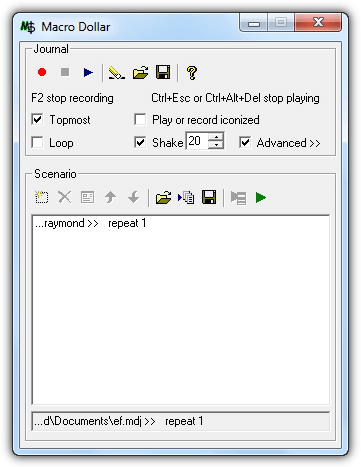
This is an automation software that is very old and easy software. This software is called macro software because it can record both your mouse and keyboard work. The latest has been added to a new feature called Shake.However this feature is rarely used. However, French-made macro dollars are slightly different than others. You can try it.
^
|
|
|
What is actually this automation software? These are software that lets you do many things that you have to repeat.For example, an email has to be given initially for the same reply.Or Bitcoin Income is free to catch a free beta dot in the bar. You can do this kind of work by using automation software. That means you will do the job once you do it on the automation software, you will do the same thing in the same way.So let's talk about this thing and do not need to talk about it. And when I said the truth? In fact, you do not feel bored to read, so sometimes I do a little fun and what? Well, anyway, whatever. Let's introduce some automation software.
MACRO DOLLAR
**/No one else will think that this software will give you money/***
This is an automation software that is very old and easy software. This software is called macro software because it can record both your mouse and keyboard work. The latest has been added to a new feature called Shake.However this feature is rarely used. However, French-made macro dollars are slightly different than others. You can try it.

^
|
|
|
TO DOWNLOAD MACRO DOLLAR
WinMacro:
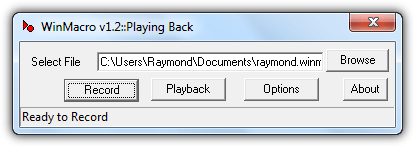
WinMacro is closer to macro dollars in terms of age. But the age can work as much as before. To record the file, only 3 steps, record browsing and location. To record, press the Record button, press the pause / break button from the keyboard to stop the record. When you want to do the previous job or if you need to do it, simply click on Browse and select the log file and press the Playback button. That is why the previous work will start. Work alone. When you need to cancel the task, press ctrl + esc.
Subscribe to:
Posts (Atom)
Featured Post

-
 //**Before starting the installation please disconnect your all wired or wireless connection having internet access**// • Fi...

